
Dental insurance verification for Open Dental practices
Start a check for one patient or the whole day's schedule. Praktend finds the payer from the plan in Open Dental, asks it for coverage and benefits, and returns a summary you can download as a PDF or Word file. Nothing is written to the Open Dental ledger.

Sage
AI assistant

- $199 a month300 verified appointments includedPublished pricing
- No payer IDsPraktend finds the payer from the plan in Open DentalHow a check starts
- “Not sent”shown where the payer sent no value; a practice-setting value is marked, such as “Waived*”What a check returns
What a check returns
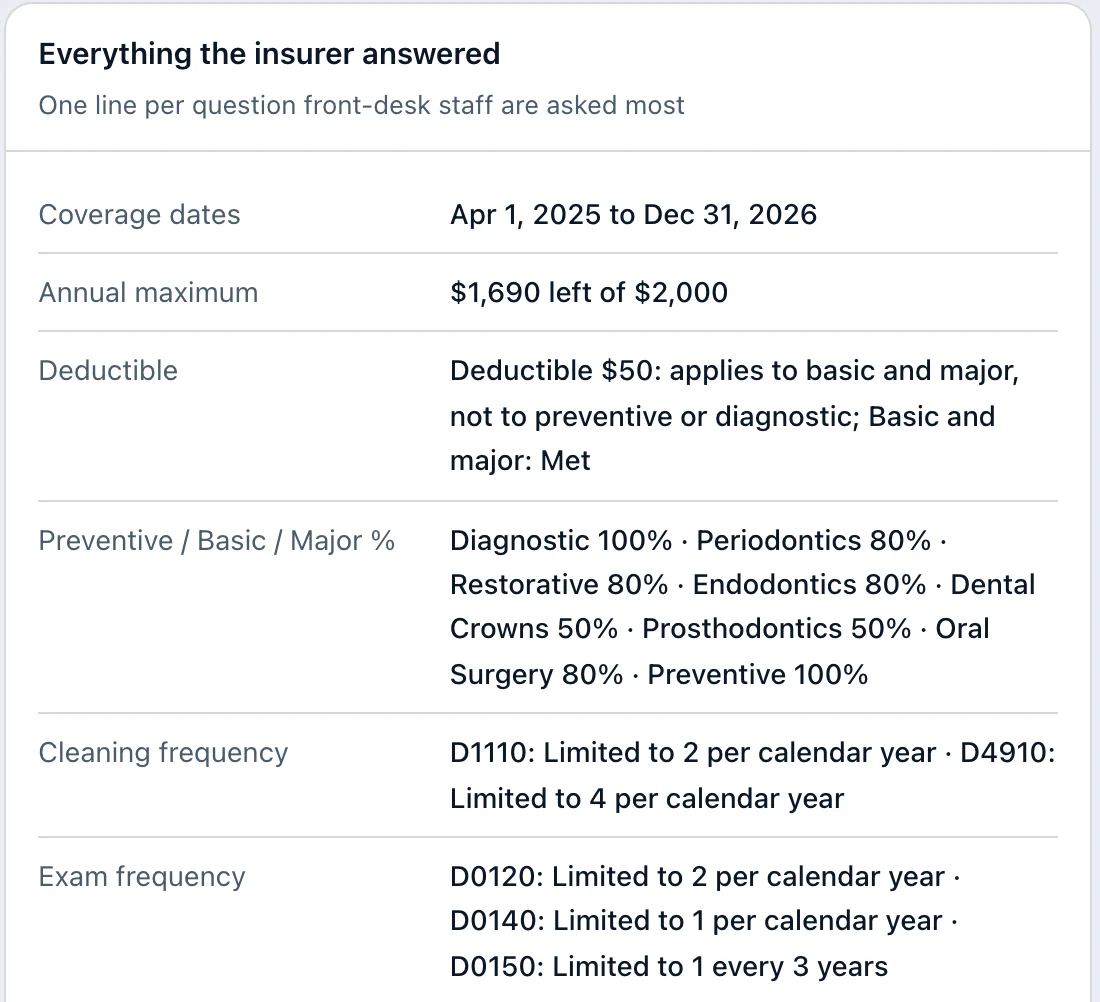
For each patient, the summary shows whether coverage is active and the benefits as the payer reports them.
- Deductible and annual maximum, shown as the amount left of the total
- Coverage percentages and limits, such as how often a service is covered
- "Not sent" where the payer did not send a value, and a value from your practice settings is marked (for example "Waived*"), so nothing is passed off as the payer's
- Items to confirm by phone when the payer sends conflicting values
- A summary you can download as a PDF or Word file
Insurance Verification checks commercial dental plans. For other plan types, your team checks those the usual way.
Without and with Praktend
| Task | Without | With Praktend |
|---|---|---|
| Find the payer | Look up a payer ID or portal for each plan. | Praktend reads the plan in Open Dental or matches the carrier name. |
| Get benefits | Portals or calls, one patient at a time. | One check for a patient or the whole day's schedule. |
| Missing values | A blank is easy to fill with a guess. | "Not sent" where the payer sent no value. A value from your practice settings is marked, such as "Waived*". |
| Conflicting values | Easy to miss until the patient is in the chair. | Listed as items to confirm by phone. |
| Keeping a record | Benefits retyped by hand. | A summary as a PDF or Word file. An optional Attach to chart button, off unless turned on for your practice. |
How to run a check
Pick the patient or the dates.
One patient from Praktend's chat, using the details your front desk already has, or every appointment on the dates you choose.
Praktend finds the payer and asks it.
It reads the plan on the patient's record in Open Dental, or matches the carrier name. When a name fits more than one payer, you pick from a short list.
Read the verdicts and download the summary.
Open a patient's benefits for the plan values and the procedure table, or download the summary as a PDF or Word file.
Your practice's admin can run any check. Other team members can check single patients once your admin gives them access and staff access is turned on for your practice. Asking about the same patient again for the same appointment date reuses the first answer.
What it does not do
- Insurance Verification does not change appointments, insurance plans or the ledger in Open Dental. An optional Attach to chart button, off unless turned on for your practice, lets an admin add the benefits PDF to a patient's chart.
- It sends nothing to patients.
- It does not make up a number the payer left out. A deductible your practice settings mark as waived shows as "Waived*".
- It does not touch your books.
- It works with Open Dental only.
Approvals
Starting a check is your team's go-ahead for that question to go to the payer. Nothing goes to a patient or into your books. Attaching the benefits PDF to a chart is a separate admin action, only if your practice has turned it on. Your admin decides who can run checks, and approval actions are recorded in an audit log.
Pricing
| What | Price |
|---|---|
| Monthly price | $199 a month with 300 verified appointments included |
| Each extra verified appointment | $0.50. Overage is not charged at this time. |
| Free trial | 14-day free trial when Insurance Verification is the first thing your practice buys |
| Setup | No setup fee |
Questions about insurance verification
Do we need payer IDs?
No. Praktend reads the plan on the patient's record in Open Dental, or matches the carrier name, and asks you to pick from a short list when a name fits more than one payer.
Which insurance plans can it check?
Commercial dental plans. For other plan types, your team checks those the usual way.
What if the payer doesn't send a value?
The summary says "not sent". Praktend does not make up a number the payer left out. A value that comes from your practice settings, such as a waived deductible, is marked, for example "Waived*".
Does checking the same patient twice cost twice?
Not for the same appointment date.
Asking again for the same patient and the same appointment date reuses the first answer, so it isn't counted twice. A check on a later day asks the payer again and counts as a new check. Each verified appointment covers up to 2 checks.
We use a different practice management system. Can we still use it?
Insurance Verification works with Open Dental. Choose your system when you book a demo and we'll talk through your setup.
Is patient data protected?
Our trust page lists what is in place and which vendors touch patient data.
See a check run on a sample schedule.
Fifteen minutes, on sample data, with time for your questions.
Book a 15-minute demo